4 LOGIN
8 HOME 7 CONTACT MDEX 6 HELP 5
3 CART
About us
Terms & Conditions
JOIN US PRODUCTS COMMUNITY MY TRADE MARKETPLACE ABOUT MDEX
MDEX Select
  Contact Supplier
 
Home Bags & Luggages KATA BAGS KATA KT DL-DC-443 SHOULDER BAG FOR REFLEX CAMERA WITH ATTACHED ZOOM LENS AND ACCESSORIES
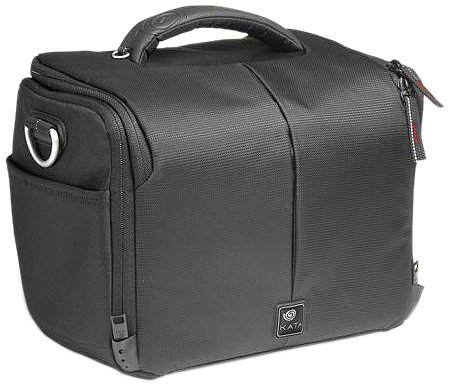
 
KATA KT DL-DC-443 SHOULDER BAG FOR REFLEX CAMERA WITH ATTACHED ZOOM LENS AND ACCESSORIES

List Price : RM294.00
List Price (Include GST) : RM311.64
Product Code : KT DL-DC-443
Product Category : Luggage
Unit of Measurements : 1 Unit
Minimum Order Quantity : 1
   
 
Description :

KATA KT DL-DC-443 SHOULDER BAG FOR REFLEX CAMERA WITH ATTACHED ZOOM LENS AND ACCESSORIES


Digital Case-443 DL

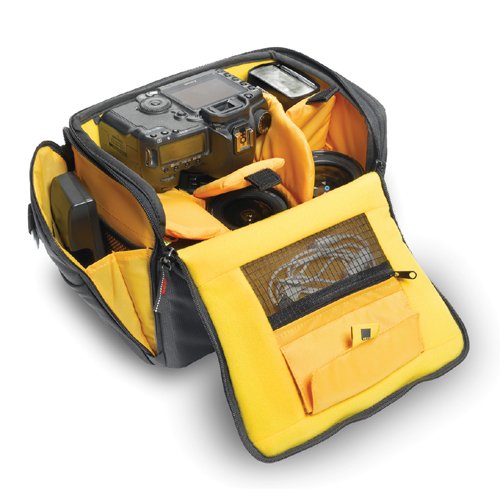
The Digital Case-443 DL is a compact camera bag with various carrying options. It features unique TST RIB structural protection and is designed with style to hold and organize your Pro-DSLR with mounted zoom lens and battery, or camcorder, plus 3-4 additional lens, flash and accessories.



Individual Customization

The main compartment holds a Pro-DSLR with mounted zoom lens and battery in top grip position, or a handycam, with ample room to store 3-4 additional lens, flash and other accessories. A built in pocket in the lid stores media cards and batteries close at hand. The yellow interior padding makes it easy to find even the smallest components and accessories.


Individual Customization

The main compartment holds a handycam, with ample room to store other accessories. A built in pocket in the lid stores media cards and batteries close at hand. The yellow interior padding makes it easy to find even the smallest components and accessories.


Extra Storage

Numerous pockets provide storage solutions for all you may need to carry: Two built in pockets for storing media cards and batteries close at hand, two spacious side pockets to hold accessories such as charger, cables etc. and one flexible, quick access, external Elasto-Guard side pocket. The TST Rib provides discreetly structured protection, where it really counts!


Carrying Options

The dual-side adjustable Elasto-Guard padded shoulder strap, the top carrying handle and belt loops, provide different options for traveling comfortably with your gear.


Elements cover

The provided elements cover will protect your valuable equipment during extreme weather conditions. Simply pull it over the bag for rain protection or use as a dust cover.


KATA LIGHTRI-315 DL DIGITAL TORSO-PACK
KATA MARVELX 20 DL CAMERA HOLSTER, MIRRORLESS CAMERA POUCH ( LIKE SONY NEX )
KATA MARVELX-30 DL MIRRORLESS CAMERA POUCH FOR 4-3 CAMERA - KT-DL-MX-30
KATA MARVELX 40 DL CAMERA HOLSTER
KATA KT DL-N-3 NIMBLE-3 DL COMPACT SATCHEL BAG (BLACK)
       
KATA KT DL-N-5 NIMBLE-5 DL COMPACT SATCHEL BAG (BLACK)
KATA KT DL-ORBT-110 ORBIT-110 DL MESSENGER BAG (BLACK) FOR DSLR/W 18-55/F3.5-5.6 LENS & FLASH
KATA KT DL-ORBT-120 ORBIT-120 DL; MESSENGER BAG (BLACK) FOR DSLR WITH 16-35/F2.8 + 24 - 70 /F2.8 & FLASH
KATA KT DL-ORBT-130 ORBIT-130 DL; MESSENGER BAG (BLACK), FOR DSLR WITH 70-200/F2.8 + 2 LENS 24-70 & 16-35 & FLASH
KATA ZP-1 DL COMPACT ZIP POUCH (BLACK)
 
Sub Categories
Home Privacy Statement
Sign In Terms of Use Agreement
Contact
Order Cancellation Policy
Help Return / Refund Policy
Customer Service Marketplace Return Policy
Warranty
Complaint & Dispute
 
MDEX Learning Centre
Step 1 - Login to your seller account Step 6 - Add product on your MDEX account
Step 2 - Change password Step 7 - Edit product on your MDEX account
Step 3 - Create your company profile Step 8 - Delete product on your MDEX account
Step 4 - Add your company logo, letterhead and stamp Step 9 - Approve customers
Step 5 - Create product categories Step 10 - Delete customers
 
       
(c) 2026 mdex.my All rights reserved