4 LOGIN
8 HOME 7 CONTACT MDEX 6 HELP 5
3 CART
About us
Terms & Conditions
JOIN US PRODUCTS COMMUNITY MY TRADE MARKETPLACE ABOUT MDEX
MDEX Miscellaneous General Merchandise Stores
  Contact Supplier
 
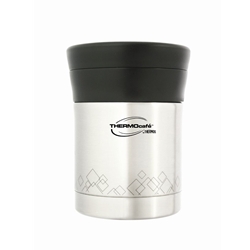
Home Containers/Food Jar THERMOS Container/Jar THERMOS BASIC LIVING FOOD JAR TC-350FJ
 
THERMOS BASIC LIVING FOOD JAR TC-350FJ


Our Price : RM62.05
List Price : RM73.00
List Price (Include GST) : RM65.77
Product Code : TC-350FJ
Product Category : Kitchen
Brand/Model : THERMOS
Unit of Measurements : 1pc/clr box
Minimum Order Quantity : 1
   
 
Description :


Model         : TC-350FJ

Description : Basic Living Food Jar

Capacity     : 0.35L

Colour        : SBK

Packing      : 1pc/clr box

Retail          : RM68

Subject to Stock Availability. Full refund will be given if we cannot fulfil. 

Please Allow 10 - 14 working days for delivery.

Thank you.   

 
THERMOS Intak Colour Change Bottle 0.70L (BF) IS4530
THERMOS Miffy On The Move Tumbler 0.35L JMK-351AB(BK)
THERMOS Miffy On The Move Tumbler 0.35L JMK-351AB(WT)
THERMOS Miffy On The Move Tumbler 0.35L JMK-351AB(RED)
THERMOS Miffy On The Move Tumbler 0.35L JMK-351AB(YL)
       
THERMOS MIFFY POCKET BOTTLE 0.30L (Pink) JNC-300
THERMOS 500ml Miffy Picnic Bottle (WT) FEJ-500B
THERMOS MIFFY EXECUTIVE TUMBLER  0.50L (Red) JNF-500B
THERMOS MIFFY EXECUTIVE TUMBLER 0.50L (Red) JNF-500B
THERMOS S/S Sippy Cup with handle 7 oz (Blue) BS500
THERMOS S/S Sippy Cup with handle 7 oz (pink) BS500
 
Sub Categories
Home Privacy Statement
Sign In Terms of Use Agreement
Contact
Order Cancellation Policy
Help Return / Refund Policy

Customer Service Marketplace Return Policy
Warranty
Complaint & Dispute
 
MDEX Learning Centre
Step 1 - Login to your seller account Step 6 - Add product on your MDEX account
Step 2 - Change password Step 7 - Edit product on your MDEX account
Step 3 - Create your company profile Step 8 - Delete product on your MDEX account
Step 4 - Add your company logo, letterhead and stamp Step 9 - Approve customers
Step 5 - Create product categories Step 10 - Delete customers
 
       
(c) 2026 mdex.my All rights reserved